

Affiliate Link Management Made Easy
Affiliate Link Management Made Easy
Hello everyone and welcome to this weeks newsletter. Today I will be sharing
with you my secrets of affiliate link management!
Before I begin I will quickly run through affiliate links for those of you
that are unfamiliar with them. Here is the webopedia (very good site if you
are looking for PC terminology) definition of an affiliate program/affiliate
link:
http://www.webopedia.com/TERM/a/affiliate_program.html
Affiliate links usually look something like this:
http://www.thesite.com?aid=26346345654
That’s fine if you are only promoting a small selection of products but how
on earth do you manage all of those links if you promote a number of different
products on a number of different websites? As you can imagine it will soon
become confusing and you will find yourself getting confused with all of the
different links for the different programs. That’s why I decided to use a simple
method of keeping track of all my links, and best of all it’s 100% free and
anyone can do it!
The method I use can be broken down into two simple parts, part one is “cloakingâ€
your link.
Cloaking your link basically means that you are “hiding†your actual
affiliate link and replacing it with a different URL. I find this gives you
a lot more control over the link, can you imagine having a standard affiliate
link in a PDF e-Book but then the merchant closes down making your link redundant.
You would have no control over that link and you could be losing potential commissions,
cloaking your link allows you to make changes to all of your links just by changing
one file.
I’m just reading through everything again and the last paragraph sounds a little
confusing (even for me which isn’t a good sign!). So let’s make this even easier,
below is an example of one of my affiliate links in normal and cloaked form.
Standard Link – http://www.xsitepro.com/cmd.php?af=470586
Cloaked Link – http://auction-arses.com/recs/xsitepro.php
As you can see the cloaked URL is actually from one of my own websites and
doesn’t contain any of my affiliate details, however if you click on both of
the links you will find that they both take you to the same page and both would
register a commission if you purchased Xsitepro.
How do you make a cloaked link? That’s incredibly simple and anyone can do
it, below is the code for the PHP page for my cloaked xsitepro affiliate link:
<?php $URL=”http://www.xsitepro.com/cmd.php?af=470586“;
header (“Location: $URL”);
exit();
?>
I have highlighted the affiliate link in red, all you need to do is change
that link your every affiliate link that you want to cloak and save the file.
I will quickly run through the process from start to finish for you.
1.Copy and Paste the above code into Notepad on your PC. Replace my affiliate
link with your own.
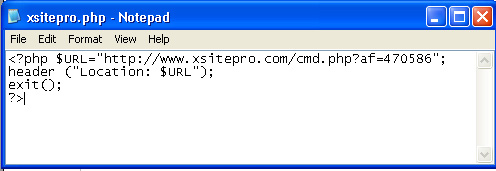
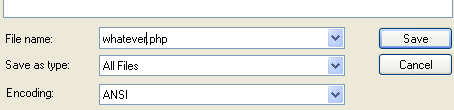
2.Save the file as something recognizable and save it as .php – this
is very important or your link wont work. Take a look at the screen below for
further guidance.
 Â
Â
That’s it, you have just cloaked your own affiliate link! You can repeat the
above method for any link that you wish to cloak.
Now for part two of the process – the uploading.
The second part is even easier than the first. All you need to do is upload
the PHP files you just created to your web space. For me this is the most important
part, so I’ll make it red just so you don’t miss it 😉
Make sure you upload all of your PHP files to a seperate folder, this will help
you find your links much easier! I have uploaded all of my affiliate links to
a folder called “recsâ€, this let’s me quickly find my affiliate
links, all I need to do is go to the following location:
http://auction-arses.com/recs/
And I get to see a full list of all my affiliate links. I would recommend any
of you that dabble with affiliates to use this method, it really will save you
a lot of time and effort in the long run.
Just to quickly go back to a point I raised earlier on about having full control
over the links. Take this scenario, I am promoting my xsitepro link in a PDF
e-Book, this is the affiliate link I am using:
http://www.xsitepro.com/cmd.php?af=470586
Now, lets say xsitepro changed their affiliate link format so the above link
no longer works. How would I be able to amend the PDF e-books with the new links?
The short answer – I wouldn’t be able to!
However if instead of the above link I used my cloaked link:
http://auction-arses.com/recs/xsitepro.php
All I need to do is change the xsitepro.php file to include the new affiliate
link, all of the affiliate links would be fine from changing that one file.
That just about wraps up my affiliate link management course, as always if
you have any questions please feel free to leave a comment.
In Closing
I would like to quickly thank all of you that sent in ideas for wedding anniversary
presents. Popular ideas were Silver Crystals, Silver Champagne Flutes and photo
frames. Thanks for all your suggestions, I will have to go shopping and see
what I can find. Also a special thanks to one of my subscribers who wrote a
poem for me to print out for the occasion!
Subscriber Specials
This is a new section for the newsletter. It basically lets you – my
readers get some exposure for your new products. If you have something that
you feel would benefit the rest of us then I am happy to help you out by including
your product in this section, I love to hear your success stories and am happy
to help with a bit of promotion! Even better if you are able to do a special
deal for the rest of us 😉
Last week we had Pat Graham’s child drug abuse reports and this week we have
a new “Mega-Pack†of goodies that has been put together by one of
my readers from here in the UK – Tom Mansell. Tom has kindly given us
a $70 discount on his product, you can click the box below for more info.

If you have a product that you would like to share with us, feel free to drop
me an email or leave a comment.
Thanks for reading,
Until next week,
Dan
Receive Free Email Updates When A New Entry Is Posted. Join Them! |
Comments
14 Responses to “Affiliate Link Management Made Easy”Receive FREE Email Updates, according to one reader it's....
"Better Than A Poke In
The Eye With A Sharp Stick"
Currently Enjoy This Blog More Than Christmas.

Follow Me Via RSS!

Subscribe to this site's RSS feed.
Wow thanx Dan. Have tried loads of ways of cloaking my aff. links and this one is so easy and very effective 😉
Hi Dan,
Just like to take a moment to thank you for this excellent newsletter article. Before reading this I thought cloaking affiliate was purely for the purpose of hiding the fact that you were using affiliate links. I never knew that it also allowed you to change the direction of the link by making a simple edit to a .php file and therefore making the whole process of managing the links much easier. I am now in the process of changing my website and ebook affiliate links to cloaked versions as they’re so much easier to manage using your instructions. Thanks for a great article. With a lot of expensive ‘link cloaking’ software out there I really appreciate finding out how simple it is for free.
Hi Dan
Excellent php info, now I can happily add all my affiliate links without worrying if they change.
Its amazing how a few simply lines can make a whole big difference!
Thanks again, Sally
Thanks for your comments.
You can also do the cloaking with HTML instead of PHP but I find PHP is much more reliable and to be honest…it’s easier!
Don’t bother paying for cloacking software, if you find it easier to use software then I would recommend a package called “Webmaster Gold”. It has loads of nifty little website tools, including a link cloaker. You can get it for free by signing up to my friend Derek’s newsletter:
http://www.1stchoicewebhost.co.uk/elpasso.htm
You have to wait for the little floatover to appear!
A great post Dan as always,easy to follow and very informative. Thanks
Cloaking links is a must for affiliate bussiness. Actually there are some services to help you do it easily but I would recommend you http://linksnapshot.com. they have a lot of feautures including RSS generation, managing your links… to help you succeed with your bussiness.
I noticed this post was way back in August 17, 2006 – Better late than never I suppose – Let me explain
Hi Dan
As usual Dan, a good post and very useful info, and the redirect works perfectly.
BUT…………………
I did have some major problems with your PHP code……… It simply did not work at first !
Now I’m no expert, far from it, and I know you are good with this sort of stuff Dan, so I presumed I must have been doing something wrong.
This is what was returned – Parse error: syntax error, unexpected ‘:’
this meant nothing to me
copied and pasted the PHP code as above again, and still not working ?
Parse error: syntax error, unexpected ‘:’
Went over to Paula Brett’s blog, and copied her code ( I remember she had a redirect PHP code there recently)
Nope this was not working also, same error as before …….. Surely there must be something wrong with the code !
NOW BY THIS TIME – I Was Getting Pi**ed off
Done a search on google……. Found another one and it worked, but on close inspection it was basically the same as Dan’s……… Now I was getting really confused.
So I put them all together in Notepad and looked closely, and finally I could see something was different and easily overlooked. Made the changes and it worked for both yours and Paula’s code.
Now i hope this is going to display correctly, and it would be easier showing an image, here goes. look very closely they are different
Both Dan’s and Paula have
DOUBLE QUOTATION MARKS like this †“
I Change them to
DOUBLE QUOTATION MARKS like this ” ”
and they all now worked, So for anyone else who copied and paste the PHP code above and it did not work, now you know why !
For any one who’s interested, here are the 3 redirect PHP Codes that work – Just replace the –
http://www.xsitepro.com/cmd.php?af=470586
with the affiliate link you want to use
(1) Dan’s version
(2) Paula’s version
(3) from the http://www.toatallyphp.co.uk website
<?php
$URL=”http://www.xsitepro.com/cmd.php?af=470586″;
header (“Location: $URL”);
Please don’t think this is a critisism in any way, I just hope it helps anyone else, who may have been pulling their hair out wondering why it did not work for them also.
Just change the Double Quotation Marks from †“ to ” ”
Phew, that was hard work, especially as i have already purchased some software that does all this for me automatically, cannot resist a challenge I guess ?
Sorry just checked the above, and the quotation marks are not displaying as i typed them, so the PHP Code is again wrong if you copy and paste.
Perhaps Dan could put up an image to demonstrate what i was talking about ?
Hi Lee,
Unfortunately it’s the way WordPress displays the quotes, there’s no getting around it.
You can see how the quotes should be in the image of my code in notepad in the body of this article.
Nice one Dan, forgot you already had the notepad image showing the correct quotes. Also, for some reason, both yours and Paula’s code did not appear the above reply, they were in the notepad file i copy and paste it from………… very weird ?
I think we’ll just blame it on those pesky WordPress gremlins Lee 🙂
Hi Dan, great post. I used it already on one affiliate site with great success. I have a question for you though.
I would like to add the Google analytics script to these php redirects so that I know how many people I am sending to the affiliate links. However, this is a php page and I don´t know if I just have to put the script below the php code, or in the middle or not at all…
Thank you and again, great post.
Hi Rodrigo, good question!
I’ve never tried integrating analytics to it, or even if it would be able to track the page, you may be best just looking at your stats program provided by your host to see how many times the file has been accessed.
But if you do want to try analytics, try putting the code under the closing PHP tag. ( ?> )