

How I Dominated Google For Resell Rights Fortune
How I Dominated Google For Resell Rights Fortune
Hello, welcome, greetings, good to see you etc, etc, etc.
Today I come bearing gifts, it’s not gold, frankincense and mur, but it’s something that could be just as valuable in the long run. I’m going to show you how I “took over” Google during the launch of Resell Rights Fortune.
Just a bit of background info before we get started.
Resell Rights Fortune is a product from Socrates Socratous, that was released on the 9th June. The product allows you to save time, by searching through a database full of different resale rights and private label products – eBooks, scripts, software, videos and so on.
Socrates asked me to promote the product for him a couple of weeks before the launch, so I put my thinking cap on and decided upon a plan of action.

As there was still 2 weeks until the launch, I decided to use a method I’d used in the past. I’d create a simple WordPress Blog, purchase a related domain name, and add some good content to the blog that relates to the product, and if all goes according to plan, I’ll end up with a good placement on Google.
I’m pleased to report that my plan worked, take a look at the image below!
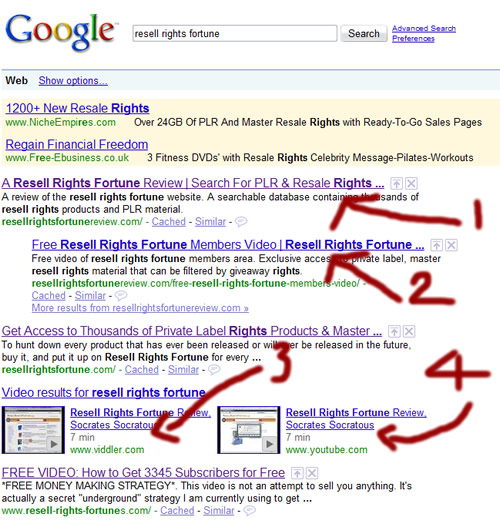
As you can see, I take the first, second, fourth and fifth position on Google for the term “Resell Rights Fortune“, I even pushed down the actual Resell Rights Fortune site into 3rd place. (Sorry Socrates:-))
You are probably thinking that’s all well and good, but does it actually get any traffic?
Simple answer, yes, it does. More proof for you below:
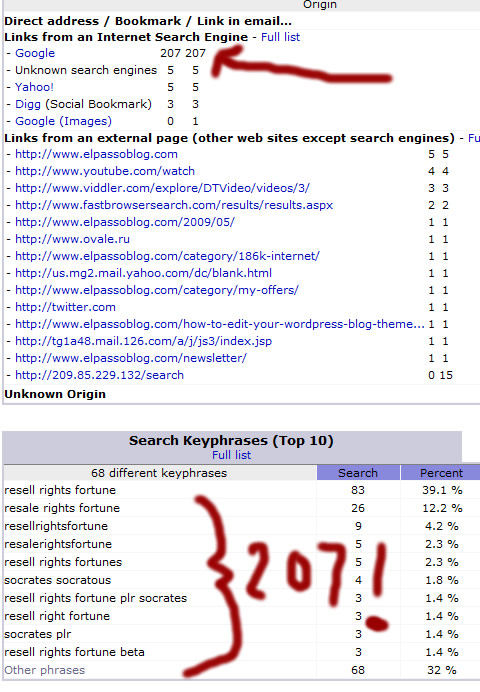
As you can see, the site received 207 hits from Google during the launch period, all of these people looking for more information on the Resell Rights Fortune product.
The site that took me less than 2 hours to setup, has helped to bring in over $2,000 in sales of the product so far, so it does work! Yes, I did send out a mailing to my list that also contributed to the sales total, but the number of clicks generated from the email was 182, so even if we say it was a 50/50 split between the list and the site, it’s still $1,000 which can’t be sniffed at for 1 simple site.
So hopefully I’ve given you enough evidence there to show you that what I did does actually bring back results, so here is EXACTLY how I did it:
1. I purchased the domain name www.resellrightsfortunereview.com from D9 Hosting. ($9.99 per year)
2. I found a WordPress theme that I liked, and then set up a blog on the domain which again, I hosted with D9 Hosting. ($6.95 per month)
3. I created a quick “sneak preview” video showing you what it was like inside the members area. I then distributed the video to a network of video sites using Heyspread.
4. I wrote some posts that I could put on the blog, each showing the reader different aspects of the Resell Rights Fortune (RRF) Product.
5. I put a link to the RRF blog on this blog, so Google could find it.
6. Once Google had indexed the site, I posted a new article every few days to keep the content fresh.
That’s it!
There really is nothing to it, so why not give it a try next time there’s a big product launch coming up? It’s a lot easier to get a few hundred hits from Google than to build a few hundred new mailing list subscribers 🙂
I’ve also just realized that I did make a blog post similar to this way back in October…..although in that promotion I used a slightly different method, so if you want another twist on the method check out the following post:
https://elpassoblog.com/how-one-video-dominated-google-for-john-thornhill-coaching/
And that just about wraps it up for this weeks blog post, I know a lot of you are first time readers, so I hope you found the information useful, and do let me know if you have any questions or feedback by leaving a comment in the section below.
Cheers!
Dan
The Best WordPress Anti Spam Plugin
The question that has been plaguing bloggers since the dawn of time.
How Can I Stop Spam Comments On My WordPress Blog?
Thankfully, there is a dead simple way to stop 99% of all spam comments. I’ve used it on my blog since I launched back in June 2006 and since then I’ve only had to remove a tiny amount of spam comments that made their way past my “Spam Defences”.
At the time of writing this post, my anti-spam plugin has stopped “11,527 Spam Comments.”
I’m sure you’ll agree that’s enough Viagra Spam to…..I’ll leave you to insert your own pun here.
Can you imagine what would have happened if I didn’t have my anti-spam plugin installed? I would have to go through and delete those 11,500+ comments manually.
It also gives me the freedom to leave my comments open, and un-moderated. This let’s me sit back and watch everyone of you comment away in “real time” without you having to wait for me to manually approve your comments.
So now you know how good it is, let me show you how to install it on your own wordpress blog.
First of all you need to know what the plugin is called. It will come as no great surprise for a lot of you, to find out I’m using the “Akismet” plugin. It’s the default anti-spam plugin that comes with all WordPress downloads. (So why don’t you use it!)
I think the thing that puts a lot of people off Akismet is the API key that you need to activate the plugin, but this isn’t nearly as complicated as it sounds. Following the step by step instructions below and spam comments will be a thing of the past!
1. Log into your WordPress admin dashboard and click on “Plugins”.
2. Aksimet comes pre-uploaded with all new WordPress installations so you don’t need to upload anything. Just look down the plugins list, find Aksimet and click on the “Activate” button.

3. You will then see a message like the one in the screen shot below asking you to enter your API key. You probably don’t already have one, so you need to click on the link that takes you to the WordPress.com Sign up page.

4. Fill out the sign up form, and in the last radio button select “Just a username please”. When done click on the “Next” button.
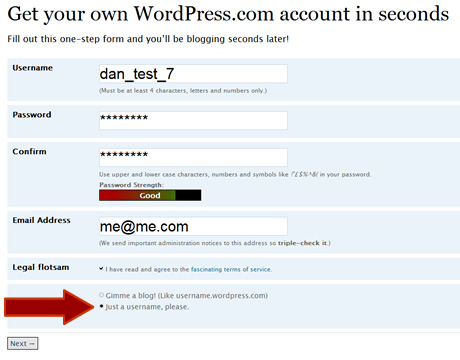
5. You then need to confirm your email address, when you have done that your account has been created and you can log into your WordPress.com dashboard.
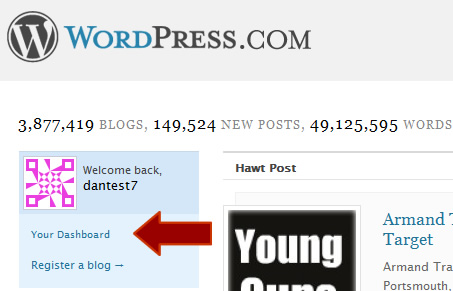
6. Once logged in, click on the “Profile” link to the right of the page. You’ll then be shown your WordPress API key.
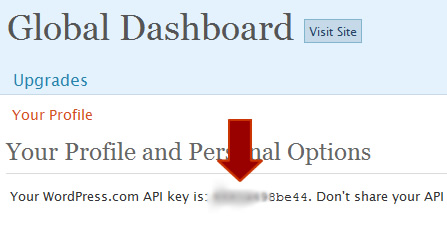
7. Now you just need to go back into your own blogs dashboard, click on Plugins > Aksimet and enter your API key in the space provided.
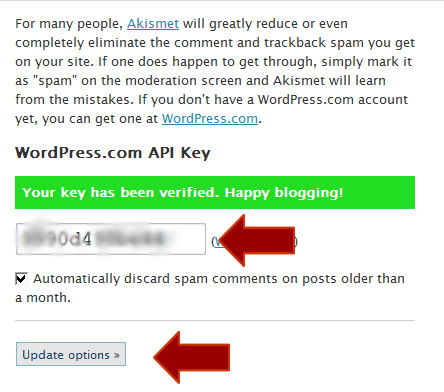
If you have entered the key correctly, you’ll get a nice green success message and the plugin will now be working on your blog. You don’t need to do anything else, you can now sleep easy at night knowing your blog will no longer be subjected to comment spam!
Thanks for reading, and let me know if you have any question.
Regards,
Dan
Why Adding Blog Comments Does Nothing For SEO
Why Adding Blog Comments Does Nothing For SEO
Hello readers, this week I have a double whammy (My spell checker doesn’t like the word but i’m leaving it in!) of articles for you. The first article that you are reading now is about dispelling a myth that leaving comments on WordPress blogs is a good way to get a back-link to your website.
The second article, that you can find underneath this one is about a nasty run in I’ve had with 1&1 Internet and a debt collection agency.
But like all chronological things, we will start at the beginning with the WordPress/SEO article.
I’m sure you have already heard this saying many times but I’ll post it again:
“Get As Many Back-links To Your Site To Improve Your Search Engine Rankingâ€
The above statement is 100% correct, BUT what isn’t correct is when people advise you that the easiest, quickest and cheapest way to get good quality back-links is by posting comments on blogs and entering your website URL. Here’s an example of a comment with a “back-link†made by one of my readers, Omar Martin.
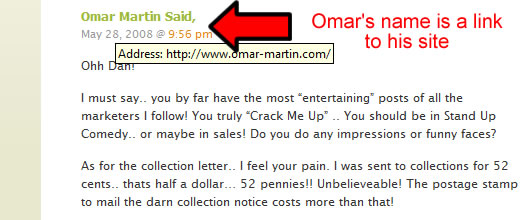
So you’d think that when the Google Bot visited my blog and looked at the comments, the Bot would follow Omar’s link out of the blog and back onto his site. Normally this would be the case, but not with a WordPress blog!
By default, WordPress adds a “nofollow†attribute to the URL’s you enter in your comments. This means that when the search engine bots see your links, they make a wide birth and totally ignore them. Don’t believe me, go look at the source code of a WordPress blog, and you’ll see the “nofollow†attribute, this is an example, again from Omars comment:

So the next time you see somebody saying that adding comments to a WordPress blog is an easy way to get a back-link, give them a slap round the face and send them to this post. Well, maybe don’t do the slap bit, but do feel free to send them to this page.
Despite all of this technical mumbo-jumbo, branding your name with your website link is still a great “Old Fashioned” way to get your website noticed. I don’t know about you, but whenever I read an interesting comment on a blog, more times than not I’ll click on that persons link and check out their site!
Thanks for reading this post, feel free as always to leave a comment – You won’t get a back-link but you will get a nice warm feeling inside! (Allegedly)
Cheers,
Dan
P.S. Next week – How to take off the nofollow attribute!
Receive FREE Email Updates, according to one reader it's....
"Better Than A Poke In
The Eye With A Sharp Stick"
Currently Enjoy This Blog More Than Christmas.
Follow Me Via RSS!

Subscribe to this site's RSS feed.